mirror of
https://github.com/mofeng-git/One-KVM.git
synced 2025-12-12 17:20:30 +08:00

92 lines
3.7 KiB
Markdown
92 lines
3.7 KiB
Markdown
<h3 align=center><img src="https://github.com/mofeng-git/Build-Armbian/assets/62919083/add9743a-0987-4e8a-b2cb-62121f236582" alt="logo" width="300"><br></h3>
|
||
<h3 align=center><a href="https://github.com/mofeng-git/One-KVM/blob/master/README.md">简体中文</a> </h3>
|
||
<p align=right> </p>
|
||
|
||
### 介绍
|
||
|
||
One-KVM是基于玩客云硬件和PiKVM软件的远控设备。通过移植PiKVM该软件至玩客云设备上,实现了极高的性价比,不到百元功能即可接近甚至超越部分昂贵的商业设备。
|
||
|
||
该软件可以帮助用户通过得到控制设备的HDMI 画面和鼠标键盘,去远程管理服务器、工作站或个人PC等。 和基于软件的远程管理方式不同,无需在被控电脑安装任何软件,实现无侵入式控制。
|
||
|
||
该项目基于PiKVM,提供了玩客云兼容PiKVM操作的自动处理脚本。
|
||
|
||

|
||
|
||
**功能特性**
|
||
|
||

|
||
|
||
|
||
### 快速开始
|
||
|
||
**方式一:直刷One-KVM镜像**
|
||
|
||
本项目Releases页可以找到包含PiKVM的预编译镜像,内核版本为5.9.0-rc7。镜像名称带One-KVM前缀、burn后缀的为线刷镜像,可使用USB_Burning_Tool软件线刷至玩客云。预编译线刷镜像为开箱即用,刷好后启动设备就可以开始使用One-KVM。
|
||
|
||
**方式二:One-KVM脚本安装**
|
||
|
||
一键脚本,对于非玩客云设备安装未作测试,适用于玩客云Armbian Jammy系统。
|
||
|
||
```bash
|
||
git clone https://github.com/mofeng-git/One-KVM.git
|
||
cd One-KVM && ./install.sh
|
||
|
||
#对于大陆网络环境,可以尝试使用下命令
|
||
wget https://mirror.ghproxy.com/https://github.com/mofeng-git/One-KVM/archive/refs/heads/main.zip -o One-KVM-main.zip && unzip One-KVM-main.zip
|
||
cd One-KVM-main && ./install.sh
|
||
```
|
||
**方式三:docker镜像部署**
|
||
|
||
目前仅有pikvm-ch9329_amd64,后续将支持更多控制方式和处理器架构。
|
||
```bash
|
||
#使用示例:
|
||
docker run -itd -p443:443 -p80:80 --name pikvm-docker --device=/dev/ttyUSB0:/dev/kvmd-hid --device=/dev/video0:/dev/kvmd-video pikvm-ch9329:0.61
|
||
```
|
||
|
||
详细内容可以参照飞书文档:[One-KVM使用文档](https://p1b237lu9xm.feishu.cn/drive/folder/IsOifWmMKlzYpRdWfcocI7jdnQA?from=from_copylink)
|
||
|
||
### 其他
|
||
|
||
|
||
**赞助**
|
||
|
||
这个项目基于众多开源项目二次开发,作者为此花费了大量的时间和精力进行测试和维护。若此项目对您有用,您可以考虑通过 [为爱发电](https://afdian.net/a/silentwind) 赞助一笔小钱支持作者。作者将能够购买新的硬件(玩客云和周边设备)来测试和维护 One-KVM 的各种配置,并在项目上投入更多的时间。
|
||
|
||
**感谢名单**
|
||
|
||
<details>
|
||
|
||
浩龙的电子嵌入式之路(赞助)
|
||
|
||
Tsuki(赞助)
|
||
|
||
H_xiaoming
|
||
|
||
0蓝蓝0
|
||
|
||
fairybl
|
||
|
||
Will
|
||
|
||
浩龙的电子嵌入式之路
|
||
|
||
自.知
|
||
|
||
观棋不语٩ ི۶
|
||
|
||
以及各位讨论交流的网友
|
||
</details>
|
||
|
||
**更新日志**
|
||
|
||
[One-KVM/ChangeLogs.txt](https://github.com/mofeng-git/One-KVM/blob/main/ChangeLogs.txt)
|
||
|
||
**Star历史**
|
||
|
||
[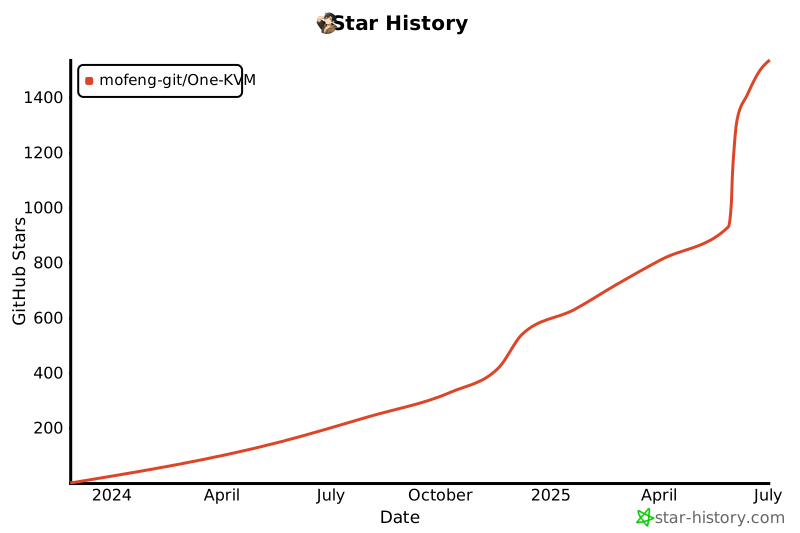](https://star-history.com/#mofeng-git/One-KVM&Date)
|
||
|
||
本项目间接或直接使用了下下列开源项目:
|
||
1. [pikvm/pikvm: Open and inexpensive DIY IP-KVM based on Raspberry Pi (github.com)](https://github.com/pikvm/pikvm)
|
||
2. [hzyitc/armbian-onecloud: Armbian for onecloud. 玩客云用armbian (github.com)](https://github.com/hzyitc/armbian-onecloud/)
|
||
3. [jacobbar/fruity-pikvm: Install Pi-KVM on debian SBCs such as Orange Pi, Banana Pi, Mango Pi, etc (github.com)](https://github.com/jacobbar/fruity-pikvm)
|