
7.7 KiB
One-KVM
An open, lightweight IP-KVM stack in Rust — remote management down to BIOS level



Overview
One-KVM (Rust) is a lightweight IP-KVM solution written in Rust. It lets you manage servers and workstations over the network, including at BIOS level.
Goals: an open, lightweight, easy-to-use IP-KVM stack.
- Open: not tied to one hardware recipe; runs across many setups.
- Lightweight: shipped as a binary with minimal moving parts for deployment.
- Easy to use: no hand-edited config files required; settings are done in the web UI.
For more information, see the One-KVM Rust documentation.
One-KVM (Python) is no longer maintained. If you still need it, see https://github.com/mofeng-git/One-KVM/tree/python.
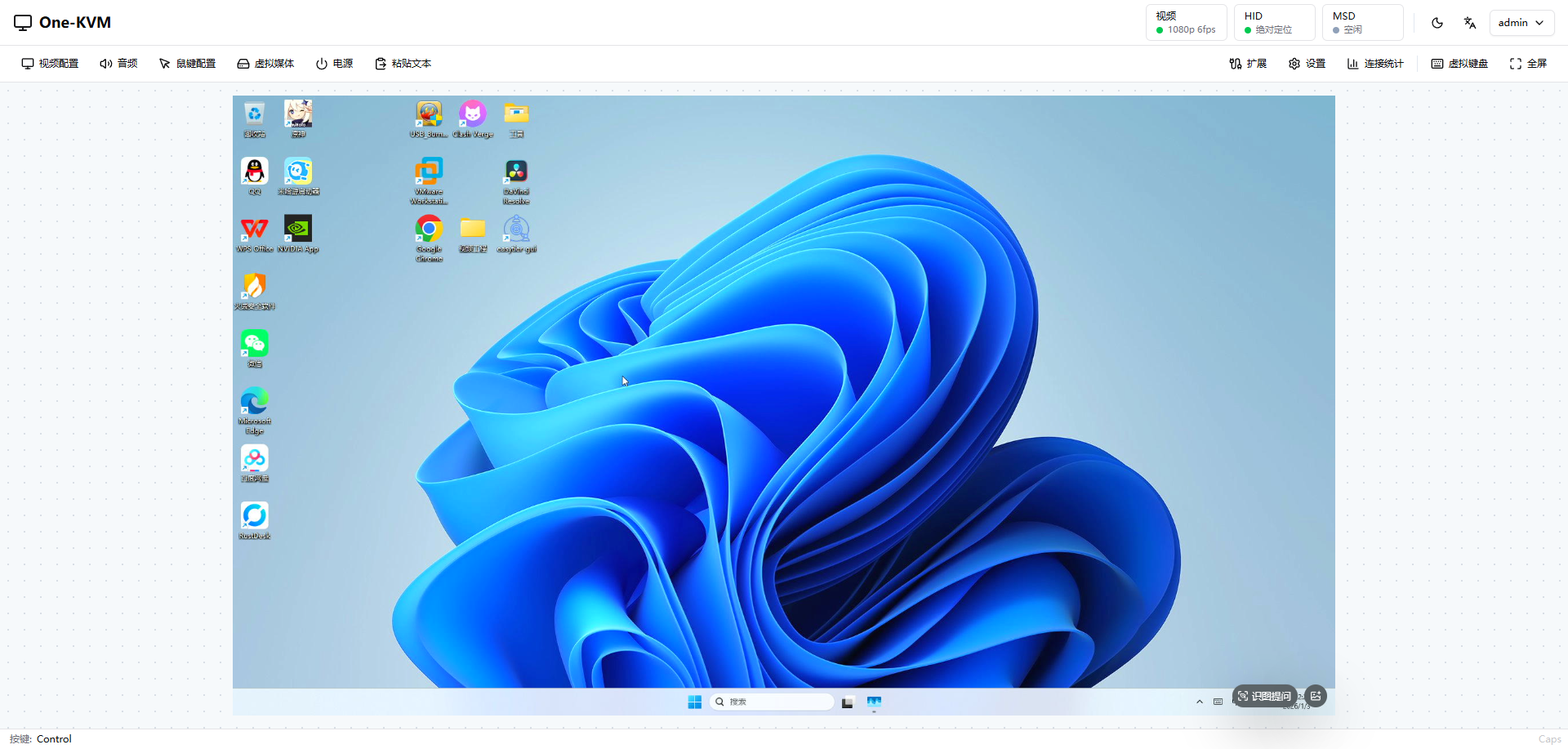
Features
Core
| Area | Capabilities |
|---|---|
| Video capture & streaming | USB HDMI capture cards, MIPI CSI, and RK3588 HDMI IN; MJPEG / WebRTC (H.264 / H.265 / VP8 / VP9) video streams |
| Video encoding | VAAPI / QSV / NVENC / AMF / RKMPP / V4L2 M2M hardware encoding, with software fallback |
| Keyboard & mouse | USB OTG HID, CH340 + CH9329 serial HID, and Bluetooth HID; absolute / relative mouse over USB or serial, relative mouse over Bluetooth |
| Virtual media | Mount ISO / IMG images through USB mass storage; virtual CD-ROM, virtual USB drive, and Ventoy multi-image boot |
| ATX power | GPIO, USB HID / serial relays for power on/off, forced shutdown, and reset; GPIO can sense power and disk activity LEDs |
| Wake-on-LAN | WOL with network interface selection and wake history |
| Audio streaming | Linux ALSA / Windows WASAPI capture with Opus encoding; stream audio from the controlled computer over WebSocket / WebRTC |
| USB microphone | Forward browser microphone audio to the controlled computer through USB OTG UAC |
| USB network sharing | NCM / ECM / RNDIS virtual adapters bridge the controlled computer to a wired network over USB |
| Remote client access | Built-in RustDesk and VNC services; RustDesk ID server / direct IP modes and VNC Tight JPEG / H.264 encoding |
| RTSP video | H.264 / H.265 RTSP streams with username and password authentication |
Feature availability depends on the platform, hardware, and drivers.
Installation
Release artifacts are on GitHub Releases. Below are brief steps for common installation methods. For full details on system requirements, hardware preparation, Docker environment variables, and USB OTG, see the One-KVM Rust documentation.
Debian / Ubuntu (.deb)
Download a one-kvm_*.deb matching your CPU architecture from Releases, then from the directory containing the package:
sudo apt update
sudo apt install ./one-kvm_0.x.x_<arch>.deb
Replace the version and architecture in the filename with your actual file name.
Docker
Images:
- one-kvm — main app + ttyd
- one-kvm-full — same plus optional extras (e.g. gostc, easytier-core)
Example:
docker run --name one-kvm -itd \
  --privileged=true --restart unless-stopped \
  -v /dev:/dev -v /sys:/sys \
  --net=host \
  silentwind0/one-kvm-full
If pulls are slow, use the Aliyun mirror, e.g. registry.cn-hangzhou.aliyuncs.com/silentwind/one-kvm-full (and registry.cn-hangzhou.aliyuncs.com/silentwind/one-kvm for the slim image).
fnOS NAS (Feiniu / 飞牛)
One-KVM is listed in the fnOS app store; search and install on your NAS.
Web UI and first run
Open http://<device-ip>:8080 in a browser (8420 after fnOS install). The first visit runs initial setup.
Reporting issues
If something breaks:
- Open GitHub Issues or report in the project QQ group.
- Include useful error messages and steps to reproduce.
- Mention software version, hardware, and OS details.
Sponsorship
One-KVM builds on many great open-source projects; a lot of time goes into testing and maintenance. If you find it useful, you can support development on Afdian (为爱发电).
Thanks
Click to view the supporter list
-
浩龙的电子嵌入式之路
-
Tsuki
-
H_xiaoming
-
0蓝蓝0
-
fairybl
-
Will
-
自.知
-
观棋不语٩ ི۶
-
爱发电用户_a57a4
-
爱发电用户_2c769
-
霜序
-
远方(闲鱼用户名:小远技术店铺)
-
爱发电用户_399fc
-
斐斐の
-
爱发电用户_09451
-
超高校级的錆鱼
-
爱发电用户_08cff
-
guoke
-
mgt
-
姜沢掵
-
ui_beam
-
爱发电用户_c0dd7
-
爱发电用户_dnjK
-
忍者胖猪
-
永遠の願い
-
爱发电用户_GBrF
-
爱发电用户_fd65c
-
爱发电用户_vhNa
-
爱发电用户_Xu6S
-
moss
-
woshididi
-
爱发电用户_a0fd1
-
爱发电用户_f6bH
-
码农
-
爱发电用户_6639f
-
jeron
-
爱发电用户_CN7y
-
爱发电用户_Up6w
-
爱发电用户_e3202
-
一语念白
-
云边
-
爱发电用户_5a711
-
爱发电用户_9a706
-
T0m9ir1SUKI
-
爱发电用户_56d52
-
爱发电用户_3N6F
-
DUSK
-
飘零
-
.
-
饭太稀
-
葱
-
MaxZ
-
爱发电用户_c5f33
-
爱发电用户_09386
-
爱发电用户_JT6c
-
爱发电用户_d3d9c
-
爱发电用户_97b41
-
偶然
-
爱发电用户_dba45
-
爱发电用户_d4f8b
-
故人。
-
WindowsHao
-
爱发电用户_d4f8b
-
爱发电用户_59f5a
-
爱发电用户_96f28
-
孤星赏月
-
t316161070
-
爱发电用户_f5gW
-
爱发电用户_5fb5c
-
爱发电用户_86d54
-
爱发电用户_maRx
-
nb
-
爱发电用户_0aa4a
-
爱发电用户_f75a7
-
爱发电用户_b4646
-
n1k0
-
Yeskf
-
魔力回旋彪
-
泡面
-
中看台的杰森
-
LWF
-
爱发电用户_b38fb
-
丨拒绝啦丶
-
爱发电用户_rGYn
-
爱发电用户_XU9y
-
爱发电用户_ec19b
-
爱发电用户_A4dE
-
爱发电用户_eYRC
-
Aleo
-
淼
-
爱发电用户_5d06d
-
Ghost_chu
-
爱发电用户_1fa21
-
爱发电用户_a7072
-
爱发电用户_9HrC
-
飒歼外寒
-
Resucdueff
-
Gentisan
-
爱发电用户_MGAx
-
爱发电用户_bce93
-
爱发电用户_60f87
-
Bottling3748
-
爱发电用户_7cbeb
-
爱发电用户_6c721
-
哦哦哦哦
-
盒子先生
-
似水流年
-
chnxan
-
......
Sponsors
This project is supported by the following sponsors:
File hosting
- Huang1111 public-interest program — login-free downloads
Cloud
-
林枫云 — project server sponsorship

林枫云 offers premium network routes, high-frequency game servers, and high-bandwidth servers in China and abroad.
-
Beta Network — project server sponsorship
Remote computers, consumer GPU servers, and dedicated physical machines with fully automated online delivery.